
What Does My Clinic's Homepage Need?
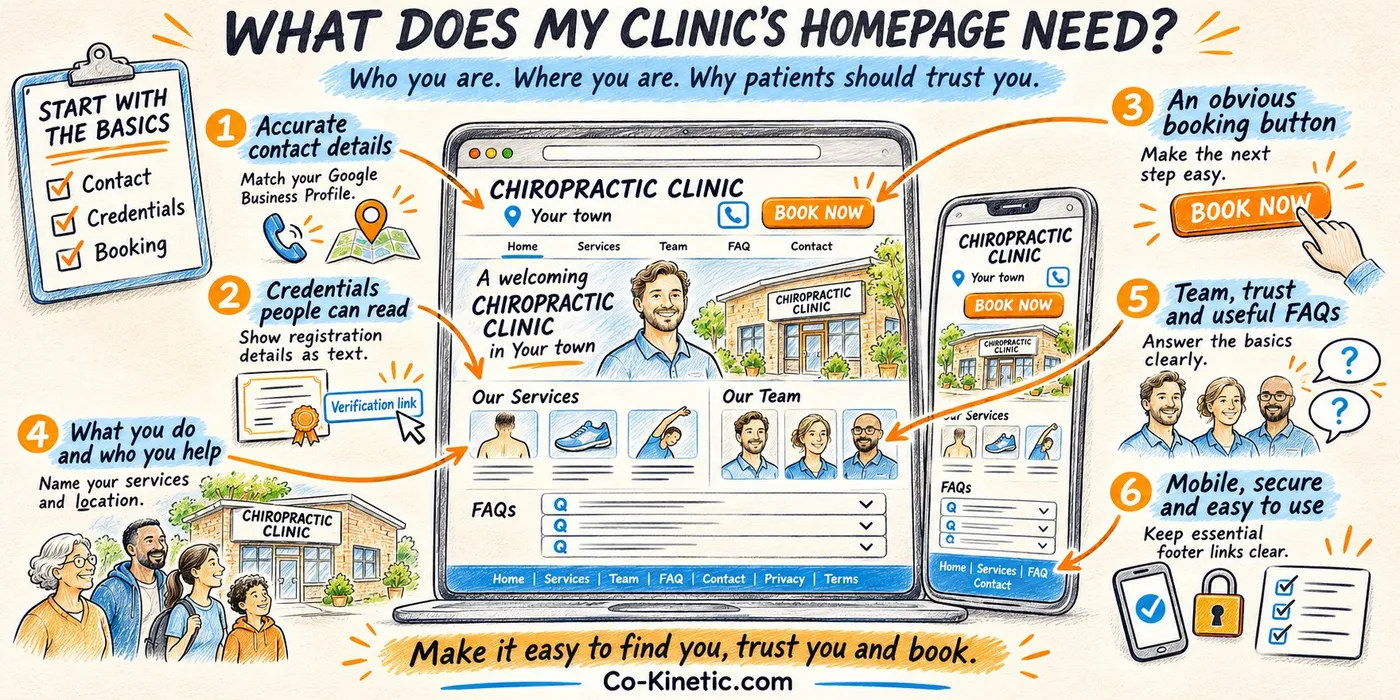
What a clinic homepage needs so patients, Google and AI tools can quickly see who you are, where you are and why to trust you. A prioritised checklist for clinic owners who want to fix the basics without a full redesign.
Reviewed and updated: November 2026
Having put more than 200 physiotherapy, osteopathy, and chiropractic websites through our visibility assessment, I need to tell you what I'm seeing.
The homepage issues showing up aren't just about looking professional or having a nice design. They're directly impacting whether AI tools like ChatGPT, Perplexity, and Google's AI Overviews can find you and recommend you to potential patients.
And here's the thing, this isn't some future concern. This is happening right now: BrightLocal's 2026 survey of 1,002 US adults found 45% now use AI tools for local business recommendations, up from 6% a year earlier. When someone asks an AI tool "find me a physiotherapist near me who treats runners," your homepage is one of the first places these tools look to understand who you are, what you do, and most importantly, whether you're trustworthy.
The Burglar Principle (Except We Want Them to Break In)
You know how security experts say burglars go for easy targets? If a house looks difficult to break into, they move on to the next one.
AI tools work exactly the same way, except in this case, you actually want them to "break in." If your homepage makes it difficult for AI to quickly find your credentials, location, and contact details, it simply moves on to the next clinic. The one that makes everything obvious and easy to find, in other words your competitor down the road.
The difference is, unlike actual burglars, we actively want AI tools to break in. In fact, we need to leave the front door wide open. That starts with not locking AI's automated readers (called crawlers) out of your site. OpenAI's own documentation says "Sites that are opted out of OAI-SearchBot will not be shown in ChatGPT search answers", and Cloudflare, a widely used website security service, began blocking AI crawlers by default on new domains in July 2025. If you're not sure whether yours are allowed in, ask your website person to check.
What I'm Actually Seeing (And Why It Matters)
Here are the most common problems:
Missing or incorrect contact information: Your name, address, and phone number (NAP) need to match your Google Business Profile exactly. Character for character. I'm seeing clinics with "Manchester Physiotherapy" on their website and "Manchester Physiotherapy and Acupuncture" on Google. It seems like a small thing, but to AI tools, these can look like two different businesses, which means they may not connect your website to all those amazing reviews you've worked so hard to build.
Professional credentials hidden in images: You've got your HCPC or GCC registration certificate beautifully displayed as an image. Unfortunately, AI can't read images (well, not reliably). It needs actual text somewhere on your page, even if it's just in the footer. Without it, AI has no proof you're qualified.
Complicated booking processes: I'm seeing booking buttons that take people through four or five different menus before they can actually book an appointment. Every extra click is a barrier, and that's a potential patient who gives up and calls your competitor instead.
No link to your Google Business Profile: If AI can't immediately connect your website to your Google reviews and location information, you're missing out on one of your biggest trust signals. It's like having a brilliant reputation but forgetting to mention it.
Why Your Homepage Specifically?
Your homepage is where AI tools start. It's the front door. When someone searches for help, AI tools scan your homepage first to quickly understand:
- Are you legitimate and properly qualified?
- Where exactly are you located?
- What conditions do you actually treat?
- How can someone contact you?
If this information isn't clear and easy to find, AI tools move on to your competitors who make it easier. Remember, they're looking for the easiest "break in."
Let's Make This Simple: Three Levels of Priority
I know this might feel overwhelming, so I've broken everything down into three levels. You don't need to do everything at once.
Level 1: Absolute Must-Haves (Do These First)
Think of these as the legal and basic trust requirements. Without these, you're either breaking the law or making it impossible for patients to trust and contact you.
- Legal basics everyone needs: Your privacy policy, terms and conditions, and cookie policy need to be linked in your footer. These aren't optional - they're legal requirements. If you process patient data (which you do), it's also good practice to show your data protection registration. And it's worth stating that you have professional indemnity insurance. Patients want to know you're properly covered.
- Contact information that actually works: Your name, address, and phone number must match your Google Business Profile exactly. I mean character-for-character exactly. If Google has "123 High Street" and your website says "123 High St," AI sees two different addresses. Your phone number needs to be in your header and clickable on mobile. Don't make people hunt for it.
- Professional credentials as actual text: Your registration or licence number needs to be visible as text somewhere on your page. Footer is absolutely fine - it doesn't need to be prominent. But it needs to be there as text, not just in an image. If you have credential logos (and you should), put them in with proper alt text describing them, but also make sure the actual registration number appears as text somewhere on the page.
- Basic technical requirements: Your site needs to be mobile-responsive (most of your visitors are on phones), secure with HTTPS (the little padlock in the browser), and load in under 3 seconds. Slow sites lose patients and rankings.
- Make it easy to book: You need a clear "Book Now" or "Contact Us" button visible immediately when someone lands on your page. And please, please don't make them click through multiple menus to book. One click should get them to the booking form.
Level 2: Good-to-Haves (These Really Move the Needle)
Once you've got the basics sorted, these additions make your homepage clearer and more convincing, for human visitors and for the AI tools reading it.
Help AI understand your location and services: Put your specific location in your main headline or opening paragraph. "Physiotherapy in Harrogate" is much clearer than "Welcome to our clinic."
- Link directly to your Google Business Profile - usually in your header or footer works well. This helps AI connect your website to your reviews.
- Make sure your opening hours are visible on your homepage and match Google exactly. AI tools pull this information directly.
Be clear about what you actually do: Don't just say "We help you move better" or other vague promises.
- Say what conditions you treat, and link each one to its own condition page. "We specialise in treating runners with knee pain, office workers with back problems, and post-surgical rehabilitation" is infinitely more useful.
- Include a "Who we help" statement that makes it clear what patient types or conditions you focus on.
Add an FAQ section: Include 3-5 of your most common questions right on your homepage, each with a short, clear answer. It saves patients hunting for the basics, and it puts those answers in plain text, in the words patients use, where AI tools can read them too. (Here's how to write an FAQ section patients actually use.)
Show your team briefly: You don't need full biographies here (those belong on each clinician's own bio page), but a brief "Meet the Team" section on your homepage with names, photos, and qualifications helps build trust. Include years of experience if you have them: patients look for it, and it's exactly what Google's own quality guidance asks about (who is behind this, and what experience do they have?).
Get your reviews right: If you show reviews on your homepage, they must be actual text, not screenshots. AI can't read screenshots, at least not as easily as text, so those beautiful review images take a hit when it comes to AI visibility. Check your country's health advertising rules first, too: in Australia, for example, testimonials aren't allowed in health advertising.
Schema markup (bear with me): This is a bit technical, but it's basically a way of labelling your website so search engines understand exactly what type of business you are. You want LocalBusiness or MedicalBusiness schema (or both). It won't get you cited by AI on its own: Google says there's "no special schema.org structured data that you need to add" for its AI features, and when Ahrefs tracked 1,885 pages that added schema against 4,000 similar pages that didn't (August 2025 to March 2026), their AI Overview citations didn't go up. But it's good housekeeping that helps search engines get your basic details right. If your website person doesn't know what this means, just send them this article (and the checklist at the end), they'll understand.
Level 3: Above and Beyond (For Those Who Want to Dominate)
These aren't essential, but if you're serious about being the go-to clinic in your area, these additions give you a real competitive edge.
Additional credentials and transparency: Mention any special training or advanced certifications on your homepage. If you have a complaints procedure (you should), link to it. Add an accessibility statement. If you're a limited company, include your company registration number.
Social proof that really stands out: Show any awards, accreditations, or partnerships you have with reputable organisations.
- If you work with specific companies (occupational health contracts, sports teams, corporate wellness programmes), display their logos. Make sure you add the company names in the image alt text so AI can "read" them.
- If you're on other review platforms like Trustpilot, link to them. And if you've managed to build up 50+ Google reviews, that significantly boosts your credibility with patients comparing clinics.
Keep your homepage fresh: Display recent blog posts on your homepage, and a "last updated" date on your pages when you genuinely update them. It shows patients you're active and your information is current.
What This Actually Means for Your Practice
Here's what I want you to understand: these aren't just technical SEO tricks. This is about making it as easy as possible for the right patients to find you, trust you, and contact you.
When AI tools recommend practitioners to potential patients, they're looking for clear signals of credibility and accessibility. Every piece of missing information, every credential hidden in an image, every complicated booking process is a reason for AI to recommend someone else instead of you.
The good news? Most of your competitors haven't figured this out yet. Across the more than 200 websites I've analysed, the vast majority are making these same mistakes. Which means if you fix these issues now, you're already ahead.
Where to Start
Don't try to do everything at once. Here's my advice:
- This week: Check your NAP details match Google exactly. Make sure your registration number is visible as text. Add a link to your Google Business Profile.
- This month: Sort out your legal pages if they're missing. Fix your booking process if it's complicated. Add that FAQ section.
- Ongoing: Build those reviews, keep your content fresh, and gradually add the "above and beyond" elements as you have time.
Remember, you don't need a complete website redesign. Most of these fixes are simple additions or small changes to what you already have.
And if you want help with this, that's exactly what we've built. Our free AI visibility check shows, usually within the hour, how your clinic shows up when patients ask AI tools real questions, and who gets recommended instead. The Website & AI Visibility Review goes further: it scores every page of your website and tells you exactly what to fix first, in order.
Want to see how your homepage measures up? Download our complete homepage checklist - it breaks down everything covered in this article into a simple tick-box format.
Related reading
- Why Isn't My Website Bringing In Patients?: six mistakes that quietly cost clinics patients, from more than 200 websites assessed, and how to check yours in ten minutes.
- Should I Rebuild My Clinic Website from Scratch for AI Search?: before anyone talks you into a rebuild: why the website and pages you already have are an asset a new site can't buy, and how to make them work for AI.
- Which Pages on My Clinic Website Actually Bring In Patients?: stop spending hours on content nobody reads: the few pages that bring in most of your patients, and what to write first.
- Why Isn't AI Recommending My Clinic?: why most clinic websites are a dead end for AI, and the four page types that let it follow a patient from symptom to booking with you, instead of the clinic down the road.
References
- BrightLocal. Local Consumer Review Survey 2026. 10 March 2026. https://www.brightlocal.com/research/lcrs-ai-trust/
- OpenAI. Developer documentation on OpenAI crawlers, including OAI-SearchBot. https://developers.openai.com/api/docs/bots
- Cloudflare. Cloudflare just changed how AI crawlers scrape the internet at large (press release). 1 July 2025. https://www.cloudflare.com/press/press-releases/2025/cloudflare-just-changed-how-ai-crawlers-scrape-the-internet-at-large/
- Google Search Central. Creating helpful, reliable, people-first content. https://developers.google.com/search/docs/fundamentals/creating-helpful-content
- Google Search Central. AI features and your website (current as of December 2025). https://developers.google.com/search/docs/appearance/ai-features
- Ahrefs. Schema markup and AI citations: a matched-control experiment (data August 2025 to March 2026). 2026. https://ahrefs.com/blog/schema-ai-citations/
?Frequently Asked Questions
Why is my homepage important for AI visibility?
Your homepage is often the first place AI tools look to understand your practice and its credibility. If essential information is missing or hard to find, AI might recommend your competitors instead.
What are the must-haves for my homepage?
Your homepage should include accurate contact information that matches your Google Business Profile, clearly displayed professional credentials as text, and a straightforward booking process. These are essential for building trust and ensuring AI tools can easily recognize your business.
How can I improve my website's booking process?
Make sure your booking button is immediately visible and leads directly to the appointment form without excessive clicks. Simplifying this process can reduce the chances of potential patients giving up and choosing a competitor.
What should I include in my FAQ section?
Your FAQ section should contain 3-5 common questions with concise answers that address patient concerns. This not only helps visitors quickly find information but also improves your website's visibility to AI tools.
How often should I update my homepage content?
Regularly updating your homepage content, such as displaying recent blog posts and noting the last update date, shows that your practice is active and keeps information current. This can enhance patient trust and engagement.
What is schema markup and why is it important?
Schema markup is a technical way of labeling your website to help search engines understand your business type. While it may not directly influence AI recommendations, it aids in ensuring that your basic business details are correctly displayed online.